Introduction
Feeling like your apps aren’t as smooth as they should be? The UI lags and freezes during heavy updates? Let me introduce you to a React hook that helps: useTransition 🥷🏼
What is useTransition?
useTransition is a React hook used to defer some updates so important ones can run first.
Example Code
Imagine you have a search input for a large array and want to display results instantly. The code would look like this:
1import { useState, useTransition } from 'react';
2function SearchComponent() {
3  const [searchText, setSearchText] = useState('');
4  const [filteredData, setFilteredData] = useState(data);
5  const [isPending, startTransition] = useTransition();
6
7  function handleSearch(e) {
8    // Urgent update - immediate
9    setSearchText(e.target.value);
10
11    // Non-urgent update - can be deferred
12    startTransition(() => {
13      setFilteredData(
14        data.filter(item =>
15          item.includes(e.target.value)
16        )
17      );
18    });
19  }
20
21  return (
22    <>
23      <input value={searchText} onChange={handleSearch} />
24      {isPending && <div>Searching...</div>}
25      <ul>
26        {filteredData.map(item => <li key={item}>{item}</li>)}
27      </ul>
28    </>
29  );
30}How it Works
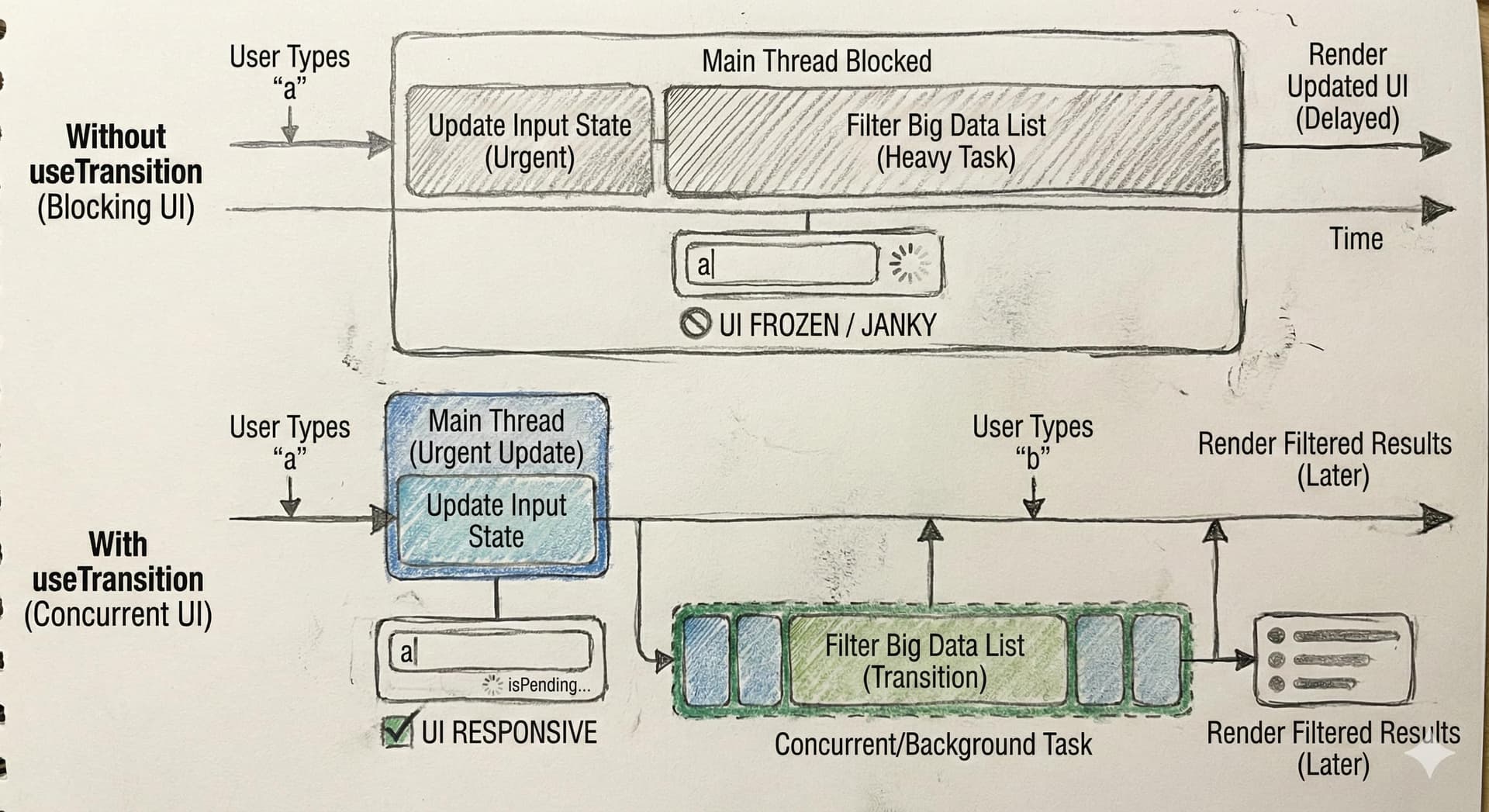
In this search process two updates happen at the same time 1ـ Updating the search text in the input → must be immediate. Updating and filtering the data → can be slightly delayed. Without useTransition, typing updates would be delayed until filtering finishes, which hurts responsiveness.
Why useTransition Helps
Here’s where useTransition comes in: useTransition separates updates into: Urgent updates: like updating the input value. Non-urgent updates: like filtering data. React understands that updates inside startTransition can be deferred if something more important is happening.
Summary
This improves responsiveness and prevents the app from freezing.